How to go from 4:3 to 16:9 transmission simply and cheaply
If you make a round of the Dutch ATV repeater stations, such as PI6ATV in IJsselstein, PI6ZDM, PI6ZTM and the rest, you see it straight away: almost everything is still 4:3. Square test cards, square camera pictures, square PIP overviews. It is 2026, every phone and every camera has long been filming in 16:9 or wider, but the ATV chain holds on to an aspect ratio from the era of the tube TV.
That is a pity, because it does not have to be that way. We could do 16:9 long before it became "normal". And the solution is not more expensive or more complicated, just less known. This article explains how it works, and how you can apply it yourself.
Back in time for a moment: how widescreen fitted into a narrow band
In the late nineties the industry faced exactly the same problem we have now. Films were widescreen, but the transmission system (PAL) was 4:3. You could not simply make the signal wider; the bandwidth and the standard were fixed.
The trick is called anamorphic, and its best-known application is PALplus. The idea is simple once you see it: you keep exactly the same number of picture lines and the same signal bandwidth, but you change the meaning of the picture. You squeeze the 16:9 picture horizontally so that it fits into the 4:3 frame. At the receiving end the monitor pulls it apart again, and you see proper widescreen.
The film world has used the same trick since the fifties with anamorphic lenses (CinemaScope): pressing widescreen onto narrow film stock, and stretching it again at projection. We did exactly the same on the videotape, only electronically.
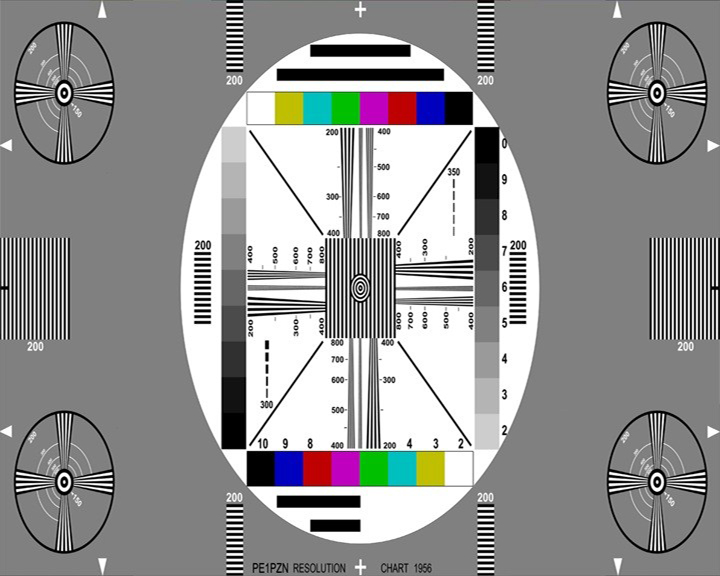
The resolution stays 720×576 (ordinary PAL). What changes is the pixel aspect ratio. In 4:3 the pixels are "narrow", in 16:9 anamorphic those same pixels are "wide". The monitor that knows it is anamorphic stretches horizontally from 720 to the width that belongs to 16:9. Not one line extra, no extra bandwidth, only a different interpretation.
We, the radio amateurs and video people who worked with professional equipment in those years, simply had this in-house at the time. In the Digital Betacam era we processed 16:9 on these tapes as if it were nothing. A squeezed picture on the monitor, straight at the top and bottom, and as soon as you set the screen to 16:9 the proportions were right again. So it is not a new technology we have to invent. It is technology we once had and forgot to apply.
The real problem: the signal does not tell the screen what it is
This is where it goes wrong in practice. An anamorphic test card looks distorted on a 4:3 screen, squeezed from left and right. That is as it should be. The screen does not know that the picture is widescreen, and leaves it squeezed. The result: everyone sees a distorted picture and concludes that you are doing something wrong.
That is exactly why explaining it is so hard. People look at the squeezed picture, see distortion, and drop out. They miss that one piece of information is missing: the signal that says "stretch me to 16:9". That signal exists, and is called WSS, Wide Screen Signalling.
WSS is a small data packet sent along on video line 23, outside the visible picture. It is a flag that tells the monitor or TV which aspect ratio the signal has: 4:3, 16:9 anamorphic, letterbox, and so on. A TV that reads WSS switches over automatically.
Note the difference with PALplus: WSS is only the control signal that tells your TV whether the picture should be shown in 4:3 or 16:9. PALplus, on the other hand, is a complete analogue transmission technique from the nineties, designed to transmit 16:9 widescreen programmes in full resolution to old 4:3 TVs. It looks the same, but it is not.
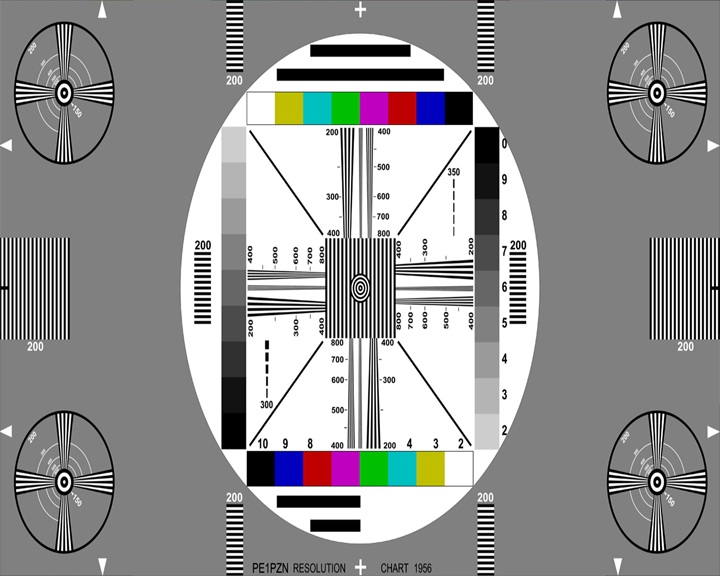
And this is the good news: modern TV screens know the concepts of aspect ratio and pixel aspect ratio perfectly well. They switch on that WSS signal. If the chain passes the flag on properly, the screen switches by itself and nobody has to adjust their screen by hand. So the problem is not that it cannot be done. It is that we often simply do not send the flag.
"But my equipment is 4:3": 4:3 is vintage
A common objection is that the equipment is 4:3. But take an honest look at what you buy today: almost every camera has long been 16:9. Action cams, IP cameras, photo cameras with video, webcams, and of course everything with an HDMI output. So the source has long been widescreen.
And then the mess arises that you now see everywhere: a 4:3 test card, but the camera picture below it is 16:9. Or people search the internet for old 4:3 cameras just to stay with that square ratio. One source does not match the other, and the whole looks messy. While the solution is within reach: simply all move to 16:9.
Connecting to the analogue ATV chain is easy too:
- Take an HDMI-to-PAL converter. It turns the 16:9 camera picture into a PAL signal.
- Connect via RCA (composite) as a quick solution, or better via BNC with a real 75 ohm cable for a cleaner, better matched signal.
That way the wide camera picture you already have enters the chain.
Composite video is a 75 ohm signal. RCA plugs work, but are not designed for impedance; with longer cables or higher demands that gives reflections and loss of quality. BNC with a 75 ohm cable terminates neatly at the right impedance, so you have no loss of sharpness, less reflection and therefore a correct display.
Why it gets stuck somewhere: the PIP units
There is an honest, practical cause for the 4:3 legacy. Many repeaters use PIP units (Picture-in-Picture) from before the 16:9 era. Those overview screens, on which you see all sources at a glance, were simply built in 4:3. And the stream to the outside world, for example on Twitch, takes over that 4:3 frame without question.
But note: even if that PIP receives anamorphic/PAL widescreen on its inputs, and you set your screen to 16:9 by hand, everything is always right. The nice thing is that it then no longer matters whether the flag is sent or not. Your screen is already set right, so the picture is right. And honestly: many amateurs cannot even set their screen correctly to 4:3 and have been watching a distorted picture for years without noticing. Setting it right once solves that in one go.
What we can actually do
The step is smaller than it looks. Not everything at once, but in the right direction:
- Keep sources wide. Cameras are already 16:9. Leave it that way and do not go back to 4:3.
- Anamorphic in the 720×576 frame. Process widescreen anamorphically, exactly as we did in the Digibeta era. It fits on the existing band without extra bandwidth.
- Send the flag. The digital baseband already has the WSS switch built in, so the flag simply goes along and the TV screen switches by itself. In the Digital Baseband you find it on the Testcard/line inserter page, at WSS Line 23.
- Or: simply set your screen to 16:9. If your PIP or monitor receives anamorphic and your screen is fixed at 16:9, it is always right, flag or no flag.
- The stream in 16:9. Let the outgoing stream use the wide frame instead of passing on the old 4:3 overview without question.
- Explain with a reference picture. A test card that looks squeezed in 4:3 and is right in 16:9 is immediate proof: set your screen right and it is straight. That convinces faster than a hundred words.
Finally
It is actually that simple: transmit anamorphic and set your screen to 16:9, and everything is right. We hold on to 4:3 not because it is better, but because it is familiar, and because the one missing piece, the widescreen flag, makes the whole story invisibly difficult. But the technology is there. We already did it in the Digibeta era, our cameras were already widescreen, the only thing you have to do is set your screen right.
And there will always be a group that anxiously clings to 4:3. You will not convince that group anyway, and you do not have to. Whoever wants to come along can do so today. The rest will come later by itself, or not. In any case the picture is straight for whoever sets it right.